

Meta Description: Discover how top-tier Web Hosting in Kenya directly impacts your SEO. Learn to pick a host with fast SSDs, high uptime, and local servers for better rankings and Core Web Vitals i.e Host Kenya

Introduction: The Invisible Engine Driving Your Kenyan SEO Success
In the competitive Kenyan digital landscape, a great website isn’t enough; it needs to be fast and always available. Your choice of web hosting in Kenya is the single most critical factor you rarely think about. While you spend countless hours optimizing content, tweaking meta descriptions, and building valuable backlinks—all vital SEO tasks—a cheap, slow server can silently sabotage all your efforts. It is the unseen foundation of your digital presence, and without a solid base, the entire structure of your SEO efforts is vulnerable.
The harsh reality is that slow websites lead to high bounce rates and poor user experience, metrics which Google—the dominant search engine globally and in Kenya—penalizes severely. Consider this staggering fact: if your site takes three seconds or more to load, nearly $\mathbf{53\%}$ of your potential mobile visitors will abandon it before the content even appears, according to Google research. This isn’t just about losing a single sale; it’s about signaling to Google’s algorithm that your site doesn’t deliver a quality experience, thereby impacting your overall search authority.
This comprehensive guide will break down exactly how reliable hosting—focusing on speed, uptime, security, and local presence—is the foundational pillar of a successful SEO strategy for any website targeting the Kenyan market. We will explore the technical connections between your host’s infrastructure and your search engine ranking, giving you the tools to choose a provider that will actively boost, not bury, your SEO efforts. Investing in the right web hosting in Kenya is the crucial first step toward achieving sustained organic growth and dominating your niche.
Why Your Web Host is Google’s First Ranking Signal for Web Hosting in Kenya
Google’s overarching algorithm is designed to prioritize the user experience (UX) above almost all else. Your web host dictates the most crucial UX metrics: speed, availability, and stability. The moment a user clicks your link in the search results, the performance of your hosting provider is already being measured. This makes your hosting choice a direct, first-line ranking factor, long before Google’s bots even fully assess the quality of your content.

A common misconception in the Kenyan digital marketing sphere is that SEO is purely content and links. In reality, technical infrastructure sets the ceiling for your SEO potential. If your server is slow, all the great content in the world won’t save your ranking, because the user (and Googlebot) won’t stick around long enough to see it.
Uptime Guarantee: The Non-Negotiable SEO Requirement
For search engines, a website that is constantly down is a dead resource. Uptime is the percentage of time your website is fully accessible and operational online. Reputable hosts offering web hosting in Kenya provide a guarantee, known as a Service Level Agreement ($\text{SLA}$), that your site will be available a certain percentage of the time.
The True Cost of Downtime on SEO
| Uptime Percentage | Allowed Annual Downtime | Allowed Monthly Downtime | SEO Impact Severity |
| 99.9% (Industry Standard) | $\mathbf{8}$ hours, $\mathbf{45}$ minutes | $\mathbf{43}$ minutes | Low – Acceptable for maintenance. |
| 99.5% (Sub-Par) | $\mathbf{43}$ hours, $\mathbf{49}$ minutes | $\mathbf{3}$ hours, $\mathbf{39}$ minutes | High – Frequent crawl failures and ranking risk. |
| 99.0% (Unacceptable) | $\mathbf{87}$ hours, $\mathbf{35}$ minutes | $\mathbf{7}$ hours, $\mathbf{18}$ minutes | Critical – High chance of de-indexing and severe penalties. |
The SEO Risk: Frequent or prolonged downtime means Googlebot—Google’s automated web-crawling software—cannot access or crawl your site. When Googlebot tries to access a page and receives a $\mathbf{5xx}$ Server Error (such as $\mathbf{500}$ Internal Server Error or $\mathbf{503}$ Service Unavailable), it marks the URL as temporarily unavailable. Repeated $\mathbf{5xx}$ errors signal an unreliable, unstable site. This rapidly leads to a massive reduction in your Crawl Budget.
Crawl Budget Impact: Google allocates a specific “budget” (time and resources) to crawl your site. If the bot consistently hits errors, it learns to reduce the frequency and number of pages it attempts to crawl. This is an official, direct penalty. If Google cannot crawl your new or updated pages, they cannot be indexed, and therefore, they cannot rank. For an e-commerce site or a high-traffic news platform in Kenya, this delay is catastrophic.
The Golden Rule: You must insist on a minimum of a $99.9\%$ uptime guarantee when selecting your web hosting in Kenya. Anything less is a direct financial and SEO risk.
Server Location (Local vs. Global) and Latency
For businesses targeting local Kenyan customers, the geographical location of your server is paramount, not just for speed, but as a subtle geotargeting signal.

What is Latency? Latency is the time it takes for a data request to travel from the user’s browser to the server and back. Think of it as the delay in a phone call: the signal takes time to travel the physical distance. The speed of light is a hard limit, and distance is the enemy of speed.
$$\text{Latency} = \text{Time to First Byte (TTFB)}$$
The Local SEO Advantage: When a Kenyan user in Nairobi requests a page hosted in a New York data center, the data has to cross continents and multiple network hops. This adds significant milliseconds of delay. Conversely, a host with a dedicated Kenyan data center (or one that is geographically optimized for East Africa) means a much shorter physical distance.
- Shorter Physical Distance $\rightarrow$ Lower Latency $\rightarrow$ Faster Time to First Byte (TTFB).
- A lower TTFB is the single most important factor for achieving a good $\text{Largest Contentful Paint}$ ($\text{LCP}$) score, which is a key ranking factor (more on this in the next section).
Choosing a local provider for your web hosting in Kenya ensures that the data travel distance is minimal for your primary audience, giving you an immediate technical advantage over competitors hosted overseas, even if they have excellent optimization otherwise. This subtle signal, paired with an appropriate Country Code Top-Level Domain ($\text{.co.ke}$), reinforces local relevance to Google.
Core Web Vitals: The Speed Metrics Reliable Hosting Directly Improves 🚀
The reliability and performance of your web hosting infrastructure are foundational to achieving “Good” scores for your Core Web Vitals. Below is a detailed breakdown of the two primary speed metrics—Largest Contentful Paint (LCP) and Interaction to Next Paint (INP)—and how a high-quality hosting stack directly addresses their common performance bottlenecks.
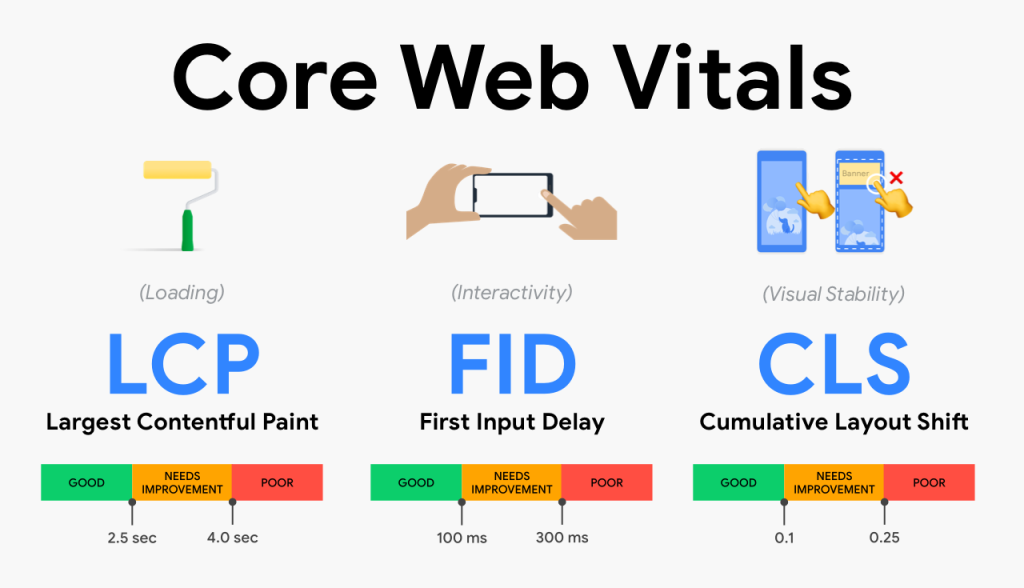
1. Largest Contentful Paint (LCP)
LCP measures loading performance. Specifically, it’s the time it takes for the largest image or text block in the viewport to become visible. Google requires an LCP of 2.5 seconds or less for 75% of your page loads to be considered “Good.”
The key to LCP is minimizing the time a page spends waiting before it can start painting the main content. This waiting time is primarily influenced by the server.
How Hosting Directly Affects LCP:
- Time to First Byte (TTFB) Optimization: The single most critical factor for LCP that hosting controls is TTFB. This is the time it takes for the user’s browser to receive the first byte of the page’s content from the server.
- Impact: A slow TTFB (above 600ms) instantly pushes LCP into the “Needs Improvement” or “Poor” categories, regardless of front-end optimization.
- Hosting Solution: Premium hosts achieve ultra-low TTFB through:
- Dedicated Resources: Non-oversubscribed CPU and RAM.
- Advanced Caching: Multi-layer caching (e.g., Redis, Varnish) at the server level, which serves content almost instantaneously.
- Fast I/O: Using NVMe SSDs for data storage, which provides extremely fast read/write speeds, cutting down the time the server takes to look up and retrieve the initial HTML document and its essential resources.
- Content Delivery Network (CDN): For sites with global traffic, the physical distance between the server and the user (network latency) becomes a bottleneck.
- Hosting Solution: A built-in or premium CDN places copies of your static assets (images, CSS, JS) on globally distributed edge servers.
- Impact: By delivering these resources from a server geographically closer to the user, the CDN drastically reduces the latency, ensuring the LCP image or block of text loads faster.
2. Interaction to Next Paint (INP)
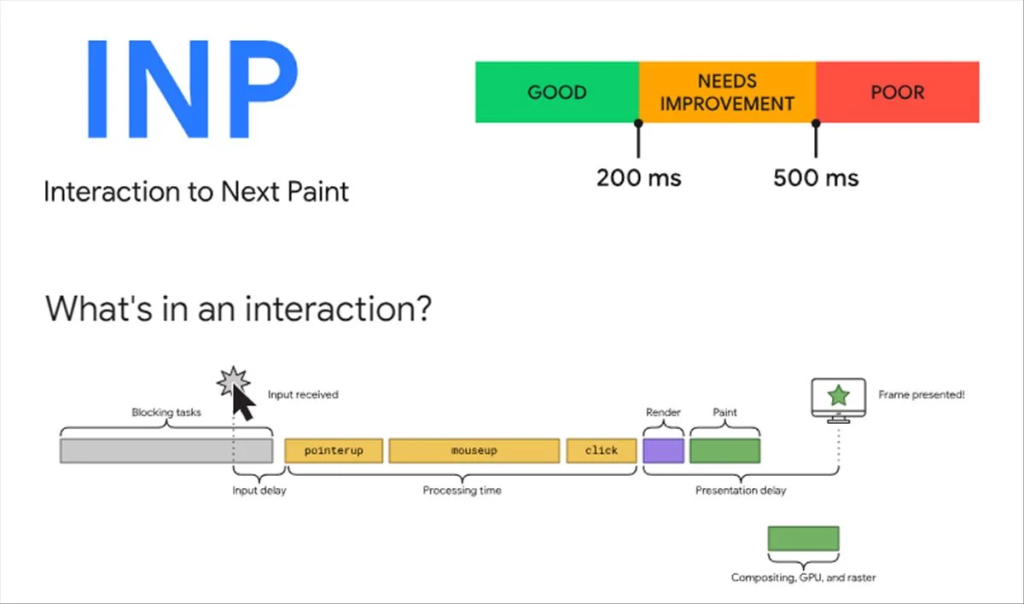
INP measures interactivity and responsiveness. It is the time from when a user interacts with a page (e.g., a click or keypress) to when the browser paints the next visible frame. To be considered “Good,” your INP score should be 200 milliseconds or less.
While much of INP optimization involves JavaScript code efficiency, the hosting environment determines the speed at which the server-side processing—a critical part of many interactions—can execute.
How Hosting Directly Affects INP:
- Dedicated CPU Processing Power: User interactions often trigger complex server-side tasks, such as updating an “Add to Cart” total, running a dynamic filter search, or validating a form.
- Impact: On low-quality, over-crowded shared hosting, the CPU is frequently throttled or busy serving other users’ requests. This creates an input delay where your server takes longer to process the request, increasing the INP score.
- Hosting Solution: Dedicated CPU cores or containers (common in managed cloud hosting) ensure your site has the guaranteed processing power it needs to run PHP, execute database queries, and process API calls instantly. This minimizes the back-end portion of the overall interaction time.
- Database Performance: Many interactions require a database query. A slow, congested database server is a common culprit for high INP.
- Hosting Solution: Premium hosting often uses optimized database stacks (e.g., MySQL or PostgreSQL optimized for high concurrency) and ensures the database has its own dedicated, fast resources separate from the web server. This allows queries triggered by a user interaction to resolve in milliseconds instead of seconds, ensuring a prompt visual response.
In summary, reliable hosting establishes the essential, non-negotiable baseline speed that allows your front-end optimizations to succeed. Without a fast, powerful, and stable server, every millisecond shaved off the front end is effectively wasted.
Hosting Stability Beyond Speed: Preventing Cumulative Layout Shift (CLS) and Downtime
While Core Web Vitals (LCP and INP) are significantly tied to raw speed, the third vital metric, Cumulative Layout Shift (CLS), relies more on the host’s stability, consistency, and resource management. This section also addresses the fundamental risk of choosing an unreliable host: Downtime.

3. Cumulative Layout Shift (CLS)
CLS measures visual stability. It quantifies the total amount of unexpected layout shift that occurs during the lifespan of a page. A “Good” CLS score is 0.1 or less.
Unexpected shifts—where text, images, or buttons suddenly jump—are often caused by resources (like images or web fonts) loading late and “elbowing” their way into the layout. A slow or unstable server directly exacerbates this problem.
How Hosting Stability Affects CLS:
- Consistent Resource Delivery: The main culprits for CLS are late-loading resources like large images, ads, or web fonts. If the server is slow or inconsistent due to high load (common in budget shared hosting), the initial HTML/CSS and the necessary media files arrive at the browser non-sequentially or with significant delay.
- Impact: This delay increases the likelihood of a Flash of Unstyled Text (FOUT) or a late-loading image or ad appearing after the browser has already painted the initial layout, causing a disruptive shift.
- Hosting Solution: A host with guaranteed, stable resources (fast SSDs and consistent CPU access) ensures that all critical-path resources are delivered to the browser as quickly and synchronously as possible, minimizing the time window in which an unexpected shift can occur.
- Avoiding Resource Queuing: High-traffic spikes can cause resource requests to get queued at the server level on under-provisioned hosting. The resources (especially CSS or fonts) that the browser needs to define the layout are delayed.
- Impact: A delay in a critical CSS file can prevent the browser from reserving the correct space for an element, leading to a layout shift when the file finally breaks through the queue and loads.
- Hosting Solution: Robust hosting infrastructure manages traffic spikes gracefully, eliminating resource queuing and ensuring the fastest possible delivery of the layout-defining assets.
4. The Critical Uptime Metric: Avoiding Downtime
Core Web Vitals measure the quality of the user experience when your site is live. However, the most fundamental measure of hosting reliability is Uptime.
Uptime is the percentage of time your website is available to visitors. An unreliable host can erase all your Core Web Vitals optimization efforts with a simple server crash.
The Direct Impact of Downtime:
- LCP/INP/CLS Score: $0.00$
- Impact: When your server is down, your website delivers a server error (e.g., HTTP 500) or simply times out. In terms of Core Web Vitals, this page load effectively results in a fail score or is non-measurable, which drastically and negatively impacts your overall performance data reported in tools like Google Search Console (via the Chrome User Experience Report).
- SEO Damage: Extended or frequent downtime signals to search engine crawlers that your site is unreliable, resulting in negative effects on your indexation and search ranking.
- Hosting Solution: The 99.9% Uptime Guarantee
- Reliable, premium hosting providers implement redundancy across every component (power, networking, storage, and even physical server units). They use modern architecture like cloud infrastructure that allows them to instantly shift your website to a healthy server should one fail.
- They typically offer a 99.9% Uptime Guarantee (or higher), which translates to less than 43 minutes of unplanned annual downtime, ensuring your Core Web Vitals scores—and your business—remain consistent and accessible.
In the next section, we can discuss the actionable steps a business can take to evaluate and select a host that meets these performance and stability criteria.
When choosing web hosting to optimize for Core Web Vitals (CWV) and overall site performance, your primary goal is to minimize server response time and maximize resource delivery speed. A slow, underpowered, or poorly configured server will hurt your Largest Contentful Paint (LCP) and First Input Delay (FID)/Interaction to Next Paint (INP) scores, regardless of your on-page optimizations.
Here are the key hosting considerations and features for optimal CWV performance:
1. Hosting Type for Performance
The hosting type directly impacts the Time to First Byte (TTFB), a key factor in LCP.
| Hosting Type | Pros for CWV | Cons for CWV | Best For |
| Managed WordPress/Cloud/VPS | Superior Performance: Dedicated or highly-optimized resources, resulting in much faster TTFB and consistent loading speeds. Often includes built-in optimizations like advanced caching and CDN. Better for INP due to reserved CPU resources. | Higher Cost: Significantly more expensive than shared hosting. | Business, e-commerce, or high-traffic sites where performance is critical. |
| Shared Hosting | Low Cost: Most affordable option. | Inconsistent Performance: Resources (CPU, RAM) are shared with many other websites. A traffic spike on a neighboring site can slow down yours, drastically increasing TTFB and negatively impacting LCP and INP. | Small, new, or low-traffic personal sites/blogs with limited budget. |
Recommendation: For serious performance and CWV optimization, Managed Hosting or a Virtual Private Server (VPS) is generally recommended over traditional shared hosting.

2. Essential Hosting Features for CWV
Look for a hosting provider that offers the following technical features as standard:
A. Fast Server Technology 🚀
- SSD/NVMe Storage: The server’s hard drives should be Solid State Drives (SSD), or even better, NVMe SSDs. They offer significantly faster data read/write speeds than older HDD (spinning disk) technology, which directly improves loading times.
- Modern PHP: The host should support the latest stable version of PHP (e.g., PHP 8.x), as each new version offers substantial performance and security improvements.
- Optimized Web Server: Hosts using high-performance server stacks like LiteSpeed or a finely-tuned NGINX configuration often outperform those running on older Apache setups.
B. Speed & Delivery Optimizations 🌐
- Content Delivery Network (CDN) Integration: A CDN caches your site’s static content (images, CSS, JS) on a global network of servers. When a user visits your site, the content is served from the server geographically closest to them, which dramatically reduces latency and improves LCP. Look for a host that includes a CDN or makes integration easy (e.g., Cloudflare integration).
- Advanced Caching: A good host provides multiple layers of caching (server-side, object caching like Redis or Memcached, and browser caching). This reduces the load on your server and allows content to be delivered much faster on subsequent visits, which is crucial for reducing TTFB and improving LCP.
- Server Location: Choose a server location that is geographically close to your target audience. For example, if you primarily serve users in Europe, host in a European data center. A CDN can help mitigate this factor for a global audience, but a fast origin server is still key.
C. Resource and Reliability 📈
- High Uptime Guarantee: An industry-standard guarantee of 99.9% uptime or better ensures your site is reliably available.
- Sufficient Resources: Your plan should offer enough CPU and RAM to handle your website’s traffic and processes. Shared hosting often oversells resources, leading to slowdowns. Managed or VPS plans guarantee a certain level of resources.
3. Core Web Vitals and Hosting Impact
Your hosting choice primarily influences the initial loading metrics:
- Largest Contentful Paint (LCP): Highly dependent on fast server response time (TTFB) and quick resource loading. A better host means lower TTFB, which is the foundational step for achieving a good LCP score.
- Interaction to Next Paint (INP): While heavily influenced by JavaScript and on-page code, a slow server with insufficient CPU can contribute to a poor INP because it delays the execution of scripts necessary for interactivity.
- Cumulative Layout Shift (CLS): This metric is least affected by hosting, as it’s primarily determined by how you code your website (e.g., reserving space for images and ads). However, a very slow server can indirectly increase CLS if elements load so slowly that their container sizes shift while the page is rendering.
4. On-Page Optimization: The Crucial Counterpart
While fast hosting provides the necessary foundation (minimizing Time to First Byte – TTFB), your on-page code and resource structure determine the remainder of the loading process and, crucially, user interactivity. A powerful server cannot fix poorly coded or bloated pages. You must optimize your content to leverage your fast hosting.

This section covers specific techniques to directly improve LCP, INP, and CLS.
A. Optimizing for Largest Contentful Paint (LCP)
LCP measures the load time of the largest visible element (typically an image, video poster, or large block of text). The goal is to make the browser render this element as fast as possible.
| Technique | Goal | Impact on LCP |
| Image Optimization | Compress and resize all images, especially the LCP candidate. Convert images to next-gen formats like WebP or AVIF. | Reduces file size, cutting download time. |
| Preload the LCP Element | Use a <link rel="preload"> tag for the LCP resource (if it’s an image or font) to tell the browser to fetch it immediately, without waiting for the CSS or JS. | Prioritizes the most critical resource, shortening its delivery time. |
| Inline Critical CSS | Extract the CSS necessary to render the “above-the-fold” content and embed it directly in the HTML’s <head> tag. Defer the rest of the CSS. | Prevents the browser from waiting for external CSS files before painting the LCP element. |
| Avoid Lazy Loading Above-the-Fold | The loading="lazy" attribute must not be applied to the LCP element or any image/iframe that is visible on initial load. | Ensures the LCP element loads instantly, not only when the user scrolls. |
B. Optimizing for Interaction to Next Paint (INP)
INP measures responsiveness by tracking the latency of all user interactions (clicks, taps, and keyboard inputs) throughout the page’s lifespan. Slow INP is nearly always caused by excessive JavaScript execution on the main thread.
| Technique | Goal | Impact on INP |
| Minimize/Defer JavaScript | Break up long JavaScript tasks (anything over 50ms) into smaller chunks. Use the async or defer attributes on non-critical <script> tags. | Frees up the main thread so it can quickly process user inputs when they occur. |
| Reduce Third-Party Scripts | Audit and remove non-essential third-party scripts (analytics, ads, tracking pixels, etc.). If necessary, load them after the page is interactive. | Third-party scripts often create “Long Tasks” that block the main thread, leading to high input delay. |
| Use CSS for Animations | Use native CSS properties (like transform and opacity) for animations instead of complex JavaScript. | CSS animations run on the compositor thread, offloading work from the main thread and ensuring smooth, non-blocking visual feedback. |
| Debouncing and Throttling | For events that fire frequently (like search input or scrolling), apply debouncing or throttling techniques to limit the number of times the event handler actually executes. | Reduces unnecessary work on the main thread, keeping it responsive. |
C. Optimizing for Cumulative Layout Shift (CLS)
CLS measures the visual stability of a page by quantifying the total unexpected shift of layout elements during the page’s loading process. The key is to reserve space for elements before they load.

| Technique | Goal | Impact on CLS |
| Specify Image and Video Dimensions | Always include the width and height attributes on <img> and <video> tags, or use the modern aspect-ratio CSS property. | Tells the browser exactly how much space to reserve for the media before it loads, preventing the content below it from shifting. |
| Reserve Space for Ads and Embeds | Before an ad network or third-party embed (e.g., social media widget) loads, allocate a fixed size for its container using minimum height/width. | Prevents unpredictable shifts when dynamic content suddenly injects itself onto the page. |
| Optimize Font Loading | Use font-display: optional or swap to control font loading behavior. If using custom fonts, preload them. | Mitigates Flash of Unstyled Text (FOUT) or Flash of Invisible Text (FOIT), which can cause text blocks to resize when the web font finally loads. |
| Avoid Injecting Content Above Existing Content | Never dynamically inject banners, forms, or other large elements into the top of the page unless it’s a direct response to a user action (like clicking a button). | Prevents content that has already rendered from being unexpectedly pushed down the page. |
In Summary: Hosting handles the Time to First Byte (TTFB), but On-Page Optimization manages the entire experience from First Contentful Paint (FCP) through Largest Contentful Paint (LCP), and subsequent Interactivity (INP). Both a powerful server and a lean codebase are essential for achieving a great Core Web Vitals score.
Core Web Vitals Measurement Tools
A variety of tools are available for measuring, reporting, and debugging Core Web Vitals performance. These tools generally fall into two categories based on the data they use:
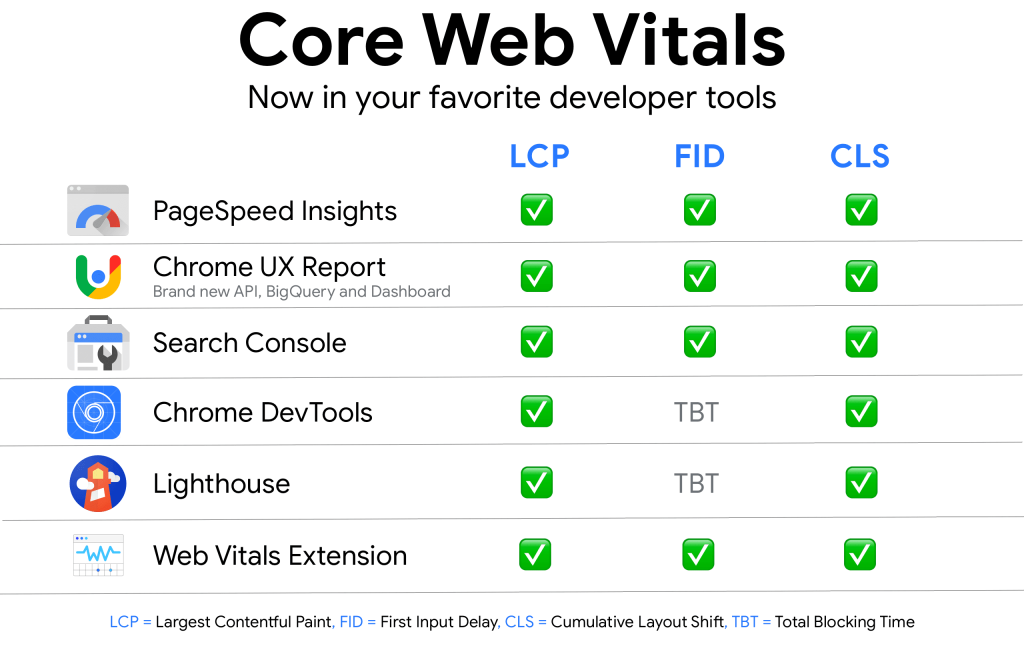
| Tool | Data Type(s) | Primary Use |
| Google PageSpeed Insights (PSI) | Field (CrUX) & Lab (Lighthouse) | Provides an overall performance score and detailed suggestions for optimization for individual pages. |
| Google Search Console (Core Web Vitals report) | Field (CrUX) | Identifies groupings of pages across your site that need improvement based on real-user data. |
| Chrome User Experience Report (CrUX) | Field | A public dataset of real-world user experience data, accessible via API or tools like PSI/Search Console. |
| Google Lighthouse | Lab | An open-source, automated tool that audits a page for performance, accessibility, SEO, and more, typically used for debugging in a controlled environment. |
| Chrome DevTools (Performance Panel) | Lab | Built into the Chrome browser for real-time performance feedback and debugging by developers. |
| Web Vitals Chrome Extension | Field | Provides a quick, real-time overlay of Core Web Vitals metrics while browsing a page. |
| WebPageTest and GTmetrix | Lab (and some field via integration) | Advanced testing tools with configurable options (location, browser, connection type) for in-depth analysis. |
Field Data vs. Lab Data
Understanding the difference between lab and field data is crucial when optimizing for Core Web Vitals:

1. Field Data (Real User Monitoring – RUM)
- What it is: Performance data collected from real users visiting your website over a recent 28-day period. This is considered the true measure of user experience, as it captures the performance impact of real-world conditions like varying devices, network speeds, geographic locations, and user activity.
- Key Characteristics:
- Real-world experience: Reflects how users actually experience your site.
- Used for ranking: Google uses this data (specifically from CrUX) for its Core Web Vitals search ranking factor.
- Metrics: Measures Largest Contentful Paint (LCP), Cumulative Layout Shift (CLS), and Interaction To Next Paint (INP).
- Data Source: Chrome User Experience Report (CrUX).
2. Lab Data (Synthetic Monitoring)
- What it is: Performance data collected in a controlled, simulated environment using predefined device and network settings.
- Key Characteristics:
- Controlled: Results are consistent and reproducible, making it ideal for debugging specific performance issues.
- Limited: It may not capture real-world bottlenecks or the full range of user experiences.
- Metrics: Measures LCP, CLS, and metrics like Total Blocking Time (TBT), which is a key lab proxy for the field metric INP (as INP requires actual user interaction).
- Data Source: Tools like Lighthouse and Chrome DevTools.
In summary: Field data tells you how fast your site is for your users, while lab data helps you find and fix performance problems in a consistent environment.