
Transferring a domain might sound like a complex process, but with the right steps, it can be done quickly and safely. In this guide, we’ll walk you through how to transfer your domain to Host Kenya in a step-by-step manner, highlighting the key actions you need to take and things you should be aware of during the transfer process. Whether you’re looking for a more reliable web host, better customer service, or local support, Host Kenya provides a seamless domain transfer experience.

What is Domain Transfer?
A domain transfer refers to the process of moving your domain registration from one domain registrar to another. This could be for various reasons, such as better pricing, more control over your domain, or improved customer service. The transfer process essentially allows you to retain ownership of your domain while changing the company that manages it.
Why Should You Transfer Your Domain?
There are several reasons why you might want to transfer your domain to Host Kenya. Here are some of the most common motivations:
- Better Pricing and Services: Many people transfer domains to access more competitive pricing or enhanced services like security features, performance, and support.
- Improved Customer Support: If your current domain registrar is unresponsive or hard to reach, transferring your domain to Host Kenya might offer better customer service.
- Better Control and Management: Host Kenya offers a user-friendly interface that makes domain management simple and intuitive.
- Local Support and Services: If your business or website caters to Kenyan audiences, having local support can be invaluable. Host Kenya provides support in your timezone and language, making it easier to resolve issues quickly.
Transferring your domain to a provider like Host Kenya is often the best choice for website owners who need a more reliable and efficient service. The process is straightforward, but there are a few things you should be aware of before you get started.
Pre-Transfer Checklist: What You Need Before Transferring Your Domain
Before you dive into the domain transfer process, it’s important to ensure that your domain is eligible for transfer and that you have everything ready for a smooth transition. Here’s a pre-transfer checklist to help you prepare for the transfer to Host Kenya.
1. Is My Domain Eligible for Transfer?
Not all domains are immediately eligible for transfer. There are a few factors that could prevent your domain from being transferred, so it’s important to check the following:
- Domain Age:
Domains can only be transferred after they’ve been registered for at least 60 days. This is an ICANN (Internet Corporation for Assigned Names and Numbers) rule that applies to all domain registrations. If your domain is newer than 60 days, you’ll need to wait before initiating the transfer. - Registrar Lock:
Domains are often locked by default at the registrar to prevent unauthorized transfers. You need to unlock your domain before the transfer can proceed. This ensures that only the domain owner can authorize the transfer process. HostKenya will request confirmation once the domain is unlocked to proceed. - Transfer Restrictions:
Some domains might have restrictions due to specific terms and conditions from your current registrar. For example, if you’ve recently transferred the domain or if there are any disputes, the transfer might be delayed. Make sure you don’t have any ongoing issues that would restrict a transfer.
2. How to Access Your Domain Registrar Account?
To transfer your domain smoothly, you need to access your current domain registrar’s platform. Here’s what you need to do:
- Log into your account: Whether your domain is hosted with GoDaddy, Namecheap, or any other provider, log into the account where your domain is registered.
- Find the domain you want to transfer: Make sure you know the exact domain name you’re transferring, as well as any associated services like email or website hosting that may also need to be updated.
You will need to access several features in your registrar account to initiate the transfer, including unlocking your domain and requesting the EPP (Extensible Provisioning Protocol) code.
3. Obtain the EPP Code
The EPP code (also known as an authorization code) is a critical part of the domain transfer process. It’s essentially a password for your domain. Here’s why it matters and how to get it:
- What is the EPP Code?
This is a unique code generated by your current registrar to confirm your identity and prove that you’re the rightful owner of the domain. Without this code, the transfer process cannot be completed. - How to Obtain the EPP Code?
You can typically find the EPP code in your registrar account’s settings under the domain management section. If it’s not readily available, your registrar will usually provide instructions on how to request it. If you can’t find the code, contact customer support.
4. Ensure Your WHOIS Information is Up-to-Date
The WHOIS database contains important information about the domain’s owner, including contact details like email addresses and phone numbers. Before you initiate a domain transfer, ensure that your WHOIS details are correct, as they will be used for communication during the transfer process.
- Why is WHOIS Information Important?
Incorrect or outdated WHOIS information can cause transfer delays or prevent your domain from transferring entirely. Make sure your email address is correct, as this is where you’ll receive the transfer verification link and status updates. - How to Update WHOIS Information?
If any information needs to be updated (such as your email address or contact details), log into your registrar account and go to the WHOIS settings. Make the necessary changes, and then check if your details are accurate before proceeding.
Summary of Pre-Transfer Checklist:
- Ensure your domain is at least 60 days old.
- Unlock your domain for transfer.
- Request the EPP code from your registrar.
- Update your WHOIS information to avoid issues.
Once you’ve completed these steps, you’re ready to initiate the transfer process to Host Kenya!
The Domain Transfer Process: Step-by-Step Guide
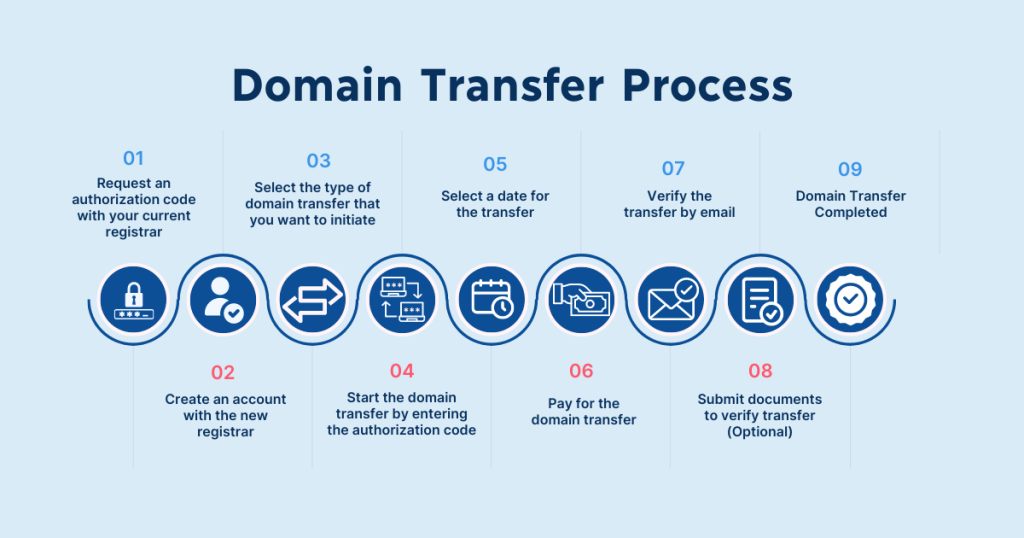
Now that you’ve completed the pre-transfer checklist, it’s time to initiate the domain transfer process. This section will guide you through each step, from unlocking your domain to finalizing the transfer with Host Kenya.
Step 1: Unlock Your Domain
Before you can transfer your domain, you need to unlock it from your current registrar. By default, domains are locked to prevent unauthorized transfers. Here’s how you can unlock your domain:
- Access the Domain Management Section of your current registrar’s account.
- Find the “Domain Lock” Option and toggle it to “Unlock” your domain.
(Note: The exact location of this setting varies by registrar, but it is typically found under domain settings or security settings.) - Save the Changes: After unlocking, save the changes and make sure you have access to the domain’s EPP code, which you’ll need in the next step.
Unlocking your domain ensures that HostKenya can take control of it during the transfer process.
Step 2: Obtain Your EPP Code (Authorization Code)
As mentioned earlier, the EPP code (also known as the authorization code) is required to authorize the transfer. Here’s how to obtain it:
- Log into your registrar account and navigate to the domain management section.
- Locate the EPP code: Most registrars will provide this in the same area where you manage your domain. It may be labeled as “Authorization Code” or “EPP Key.”
- Copy the EPP Code: Once you locate it, copy the code to use in the next step. You’ll need to enter this code during the transfer process to verify your ownership.
If you can’t find your EPP code, most registrars offer an option to request it via email or through their support channels. This code is essential for initiating a domain transfer.
Step 3: Start the Transfer Process with HostKenya
With your domain unlocked and the EPP code in hand, it’s time to start the domain transfer to Host Kenya. Here’s how:
- Create or Log into Your Host Kenya Account
If you don’t already have an account with Host Kenya, you’ll need to create one. If you already have an account, simply log in. - Access the Domain Transfer Page
Host Kenya has a dedicated page for domain transfers. You can usually find this in the “Domains” section of the Host Kenya control panel. - Enter Your Domain Information
On the transfer page, you will be prompted to enter the domain name you wish to transfer. This is the domain that is currently registered with your old registrar. - Enter the EPP Code
After entering your domain name, you will be asked to provide the EPP code you obtained from your current registrar. This is a security measure to ensure you are the rightful owner of the domain. - Review and Confirm the Transfer
Host Kenya will display the details of the transfer. Carefully review them to ensure everything is correct. Once you’re satisfied, confirm the transfer request. - Payment (If Applicable)
In some cases, you may be required to pay a transfer fee. Host Kenya’s fees are typically low, and often, the transfer will include an additional year of domain registration.
Step 4: Confirm the Transfer via Email
After submitting your transfer request, HostKenya will send an email to the address associated with your domain’s WHOIS information. This email will contain a confirmation link or button that you must click to authorize the transfer.
- What if I Don’t Receive the Email?
If you don’t receive the email, check your spam or junk folder. If it’s still not there, ensure your WHOIS email address is correct. You may need to request a new confirmation email from Host Kenya or your current registrar.
Once you confirm the transfer via email, the process will continue to the next stage.
Step 5: Monitor the Transfer Progress
Once the transfer is initiated, you can monitor its progress through Host Kenya’s dashboard or the registrar’s portal. Typically, domain transfers take 5 to 7 days to complete, but the timing can vary based on the registrar.
- What Happens During the Transfer?
Host Kenya will contact your current registrar and request the domain transfer. The registrar will then verify that the transfer request is legitimate, and once everything is confirmed, the domain will be transferred to Host Kenya. - Can I Track the Transfer?
Yes! Host Kenya’s dashboard allows you to track the progress of the transfer. You’ll receive updates on its status as it moves through different stages.
Step 6: Complete the Transfer
Once Host Kenya successfully receives confirmation from your previous registrar, the transfer will be finalized. Your domain is now officially hosted by Host Kenya!
- Final Verification
After the transfer is complete, you’ll receive a notification from Host Kenya confirming that the transfer has been successful. Log into your Host Kenya account to ensure the domain is listed under your domains section. - Check DNS Settings
It’s important to double-check your DNS settings to ensure your website and emails are functioning as expected. If you’re hosting your website with Host Kenya, you may need to update your DNS records to point to Host Kenya’s servers.
Summary of Domain Transfer Process:
- Unlock your domain at your current registrar.
- Obtain the EPP code (authorization code).
- Start the transfer by entering domain and EPP code at Host Kenya.
- Confirm the transfer via email.
- Monitor the transfer status via Host Kenya’s dashboard.
- Complete the transfer, check DNS settings, and ensure everything is functioning.
By following these simple steps, you’ll successfully transfer your domain to Host Kenya with minimal hassle and maximum security.
Common Issues During Domain Transfer and How to Resolve Them
While transferring your domain to Host Kenya is typically a smooth process, there are some common issues that can arise. In this section, we’ll go over the most frequent problems people encounter and how to resolve them quickly and effectively.
1. Domain is Locked
Problem:
When your domain is locked, it cannot be transferred. Many registrars automatically lock domains to prevent unauthorized transfers, so you must unlock it before proceeding with the transfer.
Solution:
- Unlock the Domain:
Log into your current registrar’s account, go to the domain management section, and locate the “Domain Lock” setting. Toggle the setting to “Unlock” and save the changes. - Check for Domain Lock Status:
After unlocking, double-check the status. If the domain is still locked, contact customer support for assistance.
Unlocking your domain is one of the most important steps to ensure a smooth transfer to Host Kenya.
2. Incorrect WHOIS Information
Problem:
If your WHOIS information (the contact details registered with your domain) is outdated or incorrect, the transfer may fail or be delayed. Most registrars send transfer confirmation emails to the address listed in WHOIS, so it’s crucial to keep this information up to date.
Solution:
- Update WHOIS Information:
Log into your registrar account and verify that the email address and contact information are correct. If needed, update your details and ensure that you use an active email address. - Check for Privacy Protection:
Some registrars offer WHOIS privacy protection, which can obscure your personal details. While this protects your information from public view, it can also prevent you from receiving transfer-related emails. If you have privacy protection enabled, you may need to temporarily disable it during the transfer process.
By ensuring your WHOIS details are accurate, you can avoid unnecessary delays during the domain transfer process.
3. Transfer Rejected by Current Registrar
Problem:
In some cases, the transfer request might be rejected by your current registrar. This can happen for various reasons, such as pending payments, domain status issues, or recent changes to your domain registration.
Solution:
- Contact Customer Support:
If your transfer is rejected, reach out to your current registrar’s customer support for clarification on the issue. They should provide you with the reason behind the rejection and guidance on how to resolve it. - Check for Domain Expiration:
If your domain is close to its expiration date, some registrars may not allow a transfer. Renew the domain before initiating the transfer if needed.
It’s important to keep track of your domain’s renewal date and ensure there are no outstanding issues with your current registrar to avoid a rejected transfer.
4. EPP Code Not Working
Problem:
If the EPP code you’ve obtained is incorrect, expired, or doesn’t work, you won’t be able to initiate the transfer. This is a common issue that can prevent the process from proceeding.
Solution:
- Request a New EPP Code:
If your current registrar’s EPP code is not working, request a new one. Most registrars will allow you to generate a new code or send it to you via email. - Check for Typos:
Double-check the EPP code for any typos or errors when entering it into Host Kenya’s domain transfer page. Even a small mistake can prevent the transfer from going through.
If you continue to have trouble with the EPP code, contact your registrar’s customer support for assistance in obtaining the correct code.
5. Transfer Delays Due to Domain Expiration
Problem:
If your domain is about to expire or has expired, it may delay the domain transfer process. Some registrars place a temporary hold on domains that are near expiration to ensure proper renewal.
Solution:
- Renew the Domain Before Transferring:
If your domain is nearing its expiration, renew it with your current registrar before starting the transfer process. This will ensure that the domain remains active during the transfer and avoid unnecessary delays.
Renewing your domain not only prevents expiration but can also provide an additional year of registration with Host Kenya once the transfer is completed.
Summary of Common Issues and Their Solutions:
- Domain is Locked: Unlock your domain at the registrar.
- Incorrect WHOIS Information: Update your WHOIS information and ensure the email is correct.
- Transfer Rejected: Contact your current registrar for clarification and resolve any outstanding issues.
- EPP Code Not Working: Request a new EPP code or check for typos.
- Domain Expiration: Renew your domain before initiating the transfer.
By addressing these common issues, you’ll be better equipped to handle any roadblocks that may arise during the transfer of your domain to Host Kenya.
Post-Transfer Considerations: What to Do After Your Domain is Transferred
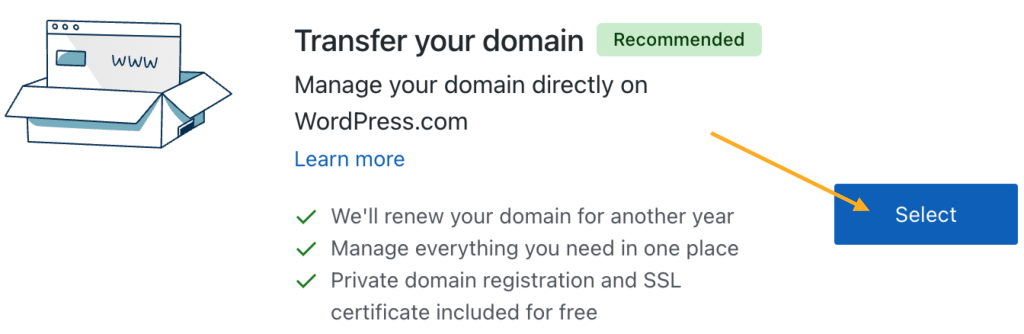
Once you’ve successfully transferred your domain to Host Kenya, there are a few important tasks to take care of to ensure everything is set up correctly and your website functions smoothly. In this section, we’ll cover what you need to do after the transfer process is completed.
1. Set Up Your DNS Settings
After transferring your domain to Host Kenya, it’s crucial to make sure your DNS settings are correctly configured to avoid any disruption to your website or email services.
Why DNS Settings Matter:
The Domain Name System (DNS) is responsible for translating human-readable domain names (e.g., www.yourwebsite.com) into IP addresses that computers use to locate servers. If your DNS settings aren’t properly configured after a transfer, your website may go offline, or your emails may fail to send or receive.
Steps to Set Up Your DNS with Host Kenya:
- Log into Your Host Kenya Account:
Go to the Host Kenya control panel (cPanel) and navigate to the DNS settings section. - Update Your Nameservers:
If you’re hosting your website with Host Kenya, you’ll need to point your domain to their nameservers. You’ll typically be given nameservers like:- ns1.hostkenya.comns2.hostkenya.com
- Verify DNS Propagation:
DNS changes can take 24-48 hours to fully propagate across the internet. During this time, your website may be temporarily unavailable. Use DNS propagation checker tools like WhatsMyDNS to track the progress of your DNS changes.
2. Verify Domain Ownership on Host Kenya’s Platform
After the transfer, it’s important to confirm that Host Kenya correctly recognizes you as the owner of the domain. This helps ensure that you can manage your domain settings and renewals without any issues.
How to Verify Domain Ownership:
- Log into Your Host Kenya Account:
Access your domain management dashboard on Host Kenya. - Check the Domain Details:
Verify that your domain is listed under the “Domains” section in your Host Kenya account. Make sure all details match your original domain registration information, including your WHOIS contact information. - Update Your WHOIS Information if Necessary:
After the transfer, you may want to update your WHOIS information to ensure it’s accurate. Some users choose to enable privacy protection at this stage, especially if they want to keep their personal details hidden from public view.
3. Renew Your Domain Registration
Many domain registrars offer a free year of registration when you transfer your domain. Host Kenya typically includes a one-year renewal with your domain transfer, but you should still confirm the expiration date.
Why Renewing Your Domain is Important:
- Prevent Domain Expiration:
Renewing your domain ensures that it stays active and is not at risk of being deleted. Make sure to mark the expiration date in your calendar and set a reminder to renew it before the next cycle. - Set Up Automatic Renewals:
To avoid any issues with domain expiration, consider setting up automatic renewals. This ensures that Host Kenya will automatically renew your domain on your behalf, so you don’t have to worry about manual renewals in the future.
4. Verify Your Email and Website Functionality
It’s essential to verify that all aspects of your website and email services are working correctly after transferring your domain.
How to Verify Website Functionality:
- Test Your Website:
After DNS propagation, visit your website to ensure it loads properly. Check for any issues related to the transfer, such as broken links or slow load times. - Check Email Functionality:
If you’re using email services tied to your domain, test your email accounts to confirm they are receiving and sending messages correctly. If you’re using Host Kenya’s email hosting, make sure the email settings are updated.
5. Monitor Domain Transfer Progress
While most transfers are completed smoothly, it’s important to monitor the progress for any issues that may arise after the transfer.
Tracking Transfer Completion:
- Check Transfer Status:
HostKenya will notify you once the transfer is complete. You can also log into your account to check the status of your domain transfer and verify that everything has been properly set up. - Keep Track of Important Dates:
Make a note of your domain’s new expiration date and set reminders for renewal. You should also keep track of when your domain transfer was finalized so that you can stay on top of any changes to your domain settings.
Summary of Post-Transfer Considerations:
- Set Up DNS Settings: Ensure your website and emails function properly after the transfer.
- Verify Domain Ownership: Confirm your domain is listed in your Host Kenya account and your WHOIS information is accurate.
- Renew Your Domain Registration: Check that your domain has been renewed and set up automatic renewals to avoid expiration.
- Verify Email and Website Functionality: Test both to ensure they are working as expected.
- Monitor the Transfer Status: Track the completion of your transfer and keep important dates in mind.
By following these post-transfer steps, you can ensure a smooth transition and avoid common issues that might arise after transferring your domain to Host Kenya.
Additional Tips for a Smooth Domain Transfer to Host Kenya
Transferring your domain to Host Kenya can be a seamless process, but there are additional tips and best practices to make the transition even smoother. This section will help you avoid potential pitfalls and ensure that your domain transfer process is as efficient as possible.
1. Keep Track of Your Domain’s Expiration Date
Why Tracking Your Domain’s Expiration is Important:
Keeping track of when your domain is set to expire is one of the most important aspects of managing your domain. If your domain expires during the transfer process, it may cause delays or issues. Most domain transfers require that the domain be active and not expired.
How to Keep Track:
- Set Calendar Reminders: After transferring your domain, make a note of the new expiration date. Set up a reminder in your calendar so you can plan for renewal in advance.
- Use Domain Management Tools: Many domain management platforms, including Host Kenya, offer renewal reminders. You can also enable automatic renewal to avoid missing the expiration date.
By staying on top of your domain’s expiration date, you ensure that your site remains live and accessible at all times.
2. Consider Transferring Multiple Domains at Once
If you have multiple domains registered with different providers, consider transferring them all to Host Kenya at once. This can simplify your domain management and help you streamline your operations.
Why Transfer Multiple Domains?
- Centralized Management: Having all your domains in one place makes it easier to manage DNS settings, renewals, and other domain configurations.
- Potential Discounts: Some registrars, including Host Kenya, may offer discounts or bundled pricing for transferring multiple domains, making it more cost-effective in the long run.
How to Transfer Multiple Domains:
- Bulk Transfer Option: Host Kenya provides a bulk domain transfer option that allows you to transfer multiple domains at once. This can save you time and effort compared to transferring each domain individually.
- Consolidate All Domains to One Account: Make sure all your domains are consolidated under one Host Kenya account to keep everything organized.
3. Secure Your Domain with Additional Features
Security is an important consideration when managing your domain. Host Kenya offers several security features that can help protect your domain and website from unauthorized access or malicious attacks.
Security Features to Consider:
- Domain Privacy Protection:
Domain privacy protection (also known as WHOIS privacy) helps keep your personal information (such as your name, address, and phone number) private in the WHOIS database. This protects you from spam, phishing attempts, and identity theft. - Two-Factor Authentication (2FA):
Adding an extra layer of security to your Host Kenya account is essential. Two-factor authentication (2FA) requires you to verify your identity using something you know (your password) and something you have (a code sent to your phone or email). - Domain Locking:
After the transfer is complete, enable domain locking to prevent unauthorized transfers. This feature keeps your domain secure by preventing it from being transferred without your approval.
How to Enable Security Features:
- Enable WHOIS Privacy Protection:
You can enable privacy protection directly from your Host Kenya account, which ensures that your personal details remain confidential. - Set Up Two-Factor Authentication:
Go to your account settings on Host Kenya and follow the steps to set up 2FA for added account security. - Lock Your Domain:
Once your domain is successfully transferred, make sure to lock it in the Host Kenya control panel. This helps protect your domain from accidental or unauthorized transfers.
4. Test Your Website After the Transfer
After the domain transfer, it’s important to thoroughly test your website and email services to ensure everything is functioning correctly.
Why Testing is Crucial:
- Website Downtime: During DNS propagation (the time it takes for DNS settings to update across the internet), your website may experience temporary downtime. It’s important to verify that everything is back to normal once propagation is complete.
- Email Functionality: If you’re using email services linked to your domain, make sure your email is working properly after the transfer. You should test both sending and receiving emails to ensure no interruptions.
How to Test Your Website and Email:
- Check Website Accessibility:
After the DNS settings have propagated, visit your website and make sure it loads correctly. Test different pages to ensure there are no issues with broken links or missing content. - Test Email Accounts:
Send test emails to and from your domain’s email addresses to ensure they are working properly. If you’re using Host Kenya’s email hosting, check your spam folders and ensure that emails are being sent and received correctly.
5. Set Up Domain Forwarding or Redirects (If Needed)
If you have multiple domains or a previous website that you no longer want to use, domain forwarding or 301 redirects can be useful.
What is Domain Forwarding?
Domain forwarding allows you to automatically redirect visitors from one domain to another. This is helpful if you own multiple domains and want to consolidate traffic to a primary website. It also helps with SEO by ensuring that traffic from old domains is properly redirected to the new one.
Setting Up Forwarding or Redirects:
- Domain Forwarding:
You can set up domain forwarding through Host Kenya’s control panel. Simply choose the domain you want to forward and specify the target URL. - 301 Redirects:
If you’re migrating content from an old website to a new one, a 301 redirect ensures that search engines and visitors are automatically redirected to the new site. You can set up 301 redirects in your website’s .htaccess file or use Host Kenya’s tools if they’re available.
Summary of Additional Tips for a Smooth Domain Transfer:
- Track Domain Expiration: Keep track of your domain’s expiration date to prevent lapses in service.
- Transfer Multiple Domains: Consider transferring all your domains to Host Kenya for easier management and potential savings.
- Enhance Security: Use features like WHOIS privacy, two-factor authentication, and domain locking to protect your domain.
- Test Your Website and Email: After the transfer, ensure that your website and email services are functioning properly.
- Set Up Domain Forwarding or Redirects: Use domain forwarding or 301 redirects if necessary to guide visitors to the correct site.
By following these additional tips, you can ensure a smooth, secure, and efficient domain transfer process to Host Kenya, while optimizing your domain management going forward.
Frequently Asked Questions (FAQs)
When transferring your domain to Host Kenya, there are common questions that come up. This section will address the most frequently asked questions about domain transfers, helping to clear up any confusion and provide additional insights into the process.

1. How Long Does It Take to Transfer a Domain to Host Kenya?
Answer:
The typical domain transfer process to Host Kenya usually takes between 5 to 7 days. However, this can vary based on the registrar from which you are transferring. The transfer time is mainly influenced by:
- The responsiveness of your current registrar: Some registrars process transfer requests faster than others.
- DNS propagation: After the transfer, DNS settings may take 24-48 hours to propagate fully across the internet.
While your domain will remain functional during this time, you may experience brief interruptions, especially with website loading times or email services, as the DNS records update.
2. Will My Website Go Offline During the Domain Transfer?
Answer:
No, your website should not go offline during the domain transfer. The actual process of transferring a domain does not affect the website files or hosting. However, DNS propagation (the time it takes for the updated DNS settings to take effect globally) can cause brief disruptions. These disruptions usually last up to 48 hours.
What You Can Do to Avoid Downtime:
- Verify your DNS settings: Ensure that after the transfer, your DNS settings are updated to point to Host Kenya’s nameservers.
- Check with HostKenya: If you are hosting your website with Host Kenya, their customer support can assist in ensuring that the transition happens smoothly without affecting your site’s availability.
3. What Happens if My Domain is Expired Before or During the Transfer?
Answer:
If your domain expires before or during the transfer, it could cause delays or even prevent the transfer altogether. Most domain registrars do not allow the transfer of expired domains.
Solution:
- Renew Your Domain: If your domain is close to expiring, it’s important to renew it with your current registrar before initiating the transfer. Host Kenya generally offers an additional year of registration with every domain transfer, so your domain won’t expire soon after the transfer.
- Domain Grace Period: Many registrars have a grace period after domain expiration, where you can still renew and transfer your domain. If your domain has expired but is within the grace period, you should still be able to transfer it to Host Kenya.
4. Can I Transfer a Domain That is Less Than 60 Days Old?
Answer:
Unfortunately, ICANN (the Internet Corporation for Assigned Names and Numbers) has a rule that prohibits transferring a domain within 60 days of its registration or a previous transfer. This rule is in place to prevent fraud and ensure that the domain owner has sufficient time to manage and secure their domain.
What Can You Do?
- Wait Until 60 Days Have Passed: If you’ve just registered the domain or transferred it recently, you’ll need to wait until the 60-day period has passed before initiating the transfer.
5. Is There a Fee for Transferring My Domain to Host Kenya?
Answer:
Yes, Host Kenya typically charges a small transfer fee for each domain transfer. This fee usually includes an additional year of domain registration, meaning your domain will be extended for an additional year after the transfer.
- Transfer Fee: This is a one-time fee that includes the domain transfer process and renewal for one year.
- Payment: You can pay the transfer fee via Host Kenya’s secure payment gateway during the transfer process.
Check Host Kenya’s pricing page for specific details on the transfer fee for different types of domains (.com, .co.ke, etc.).
6. Can I Transfer a Domain That is Locked or Pending?
Answer:
Domains that are locked or pending transfer cannot be transferred until certain conditions are met.
- Domain Lock: If your domain is locked (to prevent unauthorized changes), you will need to unlock it before starting the transfer. This can be done easily from your registrar’s control panel.
- Pending Transfer: If a domain transfer is already in progress with another provider, it cannot be transferred until that process is complete. If you’re not sure about the transfer status, check with your current registrar.
Once the domain is unlocked and the previous transfer process is completed, you can proceed with transferring it to Host Kenya.
7. What Should I Do If I Don’t Receive the Transfer Confirmation Email?
Answer:
If you don’t receive the transfer confirmation email from HostKenya or your current registrar, it’s important to check a few things:
- Check Your Spam/Junk Folder: Sometimes, email providers mistakenly mark domain transfer emails as spam.
- Verify Your WHOIS Email Address: Ensure that the email address in your WHOIS record is correct and active. If it’s outdated, update it before initiating the transfer.
- Resend the Email: You can request Host Kenya or your registrar to resend the confirmation email.
If the issue persists, contact customer support at your registrar or Host Kenya to resolve the issue.
Summary of FAQs:
- How Long Does It Take to Transfer a Domain?
- Typically 5-7 days, but may vary depending on the registrar.
- Will My Website Go Offline?
- DNS propagation may cause brief downtime, but your website files are not affected.
- What Happens if My Domain is Expired?
- Renew your domain before initiating the transfer to avoid delays.
- Can I Transfer a Domain Less Than 60 Days Old?
- No, ICANN’s rule prevents transferring a domain within 60 days of registration.
- Is There a Transfer Fee?
- Yes, HostKenya charges a small transfer fee that includes a year of registration.
- Can I Transfer a Domain That is Locked or Pending?
- No, the domain must be unlocked and not in a pending transfer state.
- What to Do If I Don’t Receive the Confirmation Email?
- Check your spam folder, verify your WHOIS email, or request a resend.
These frequently asked questions address some of the most common concerns during the domain transfer process. With the right information, you can confidently navigate the transfer process to Host Kenya.
Conclusion: Final Steps to Transfer Your Domain to Host Kenya (Fast & Safe)
By now, you should have a solid understanding of how to transfer your domain to Host Kenya quickly and safely. Whether you’re switching registrars for better pricing, improved support, or local services, the transfer process can be completed smoothly if you follow the steps and guidelines provided in this guide.

Recap of the Domain Transfer Process
To summarize, here are the key steps for transferring your domain to Host Kenya:
- Check Your Domain’s Eligibility:
Ensure your domain is older than 60 days, not locked, and has no transfer restrictions. - Unlock Your Domain and Obtain the EPP Code:
Unlock the domain and request the EPP code (authorization code) from your current registrar. - Initiate the Transfer to Host Kenya:
Log into your HostKenya account, enter the domain and EPP code, and confirm the transfer via email. - Monitor the Transfer Progress:
Domain transfers can take 5-7 days. Check the status on HostKenya’s dashboard. - Verify DNS Settings and Domain Ownership:
After the transfer is complete, ensure your DNS settings are updated and verify your domain ownership. - Renew Your Domain:
Make sure your domain is renewed, and consider setting up automatic renewals to avoid future expiration issues. - Enhance Security:
Enable domain locking, WHOIS privacy, and two-factor authentication to secure your domain from unauthorized access.
By following these steps, your domain will be successfully transferred to Host Kenya with minimal downtime and maximum security.
Why Choose Host Kenya for Domain Transfer?
HostKenya offers several benefits for users transferring their domains:
- Local Support: HostKenya’s customer support is available during local business hours and is tailored to meet the needs of Kenyan businesses and website owners.
- Affordable Pricing: HostKenya offers competitive pricing for domain transfers and hosting services, ensuring that you get great value for your money.
- Reliability: With fast and secure transfer processes, HostKenya ensures that your domain is transferred safely, with minimal hassle.
By choosing Host Kenya as your domain registrar, you gain access to a reliable service with a team ready to assist you whenever needed. The process is user-friendly and designed to be straightforward, ensuring that your domain management is as hassle-free as possible.
Final Tips for Aspiring Domain Owners
As you complete your domain transfer to HostKenya, here are a few final tips to ensure continued success with your domain management:
- Stay Consistent with Renewals: Set reminders for your domain’s renewal date to avoid any disruptions in service.
- Use Host Kenya’s Additional Services: Explore the range of hosting and email solutions offered by Host Kenya to manage your website and email services under one roof.
- Keep Learning and Adapting: The digital landscape is always changing. Stay up-to-date with new domain management tools, security practices, and hosting solutions to ensure your website’s ongoing success.
In Conclusion
Transferring your domain to Host Kenya is a simple and secure process that can provide a range of benefits, from better pricing to local customer support. By following the steps outlined in this guide, you can ensure that your domain transfer goes smoothly, with minimal downtime or complications.
If you’re ready to transfer your domain today, Host Kenya is here to help. Begin the process now and experience the seamless and secure domain management that Host Kenya provides.